
No Auglaize 72-Hour Release Feed
The Auglaize County Sheriff does not publish a rolling three-day release product. The official Inmate Inquiry offers “Show Recent Bookings,” but that view includes both active and ended bookings. The county gives no fixed window for the result, no releases-only filter, and no promise that every departure remains in Recent for three days.
Research on July 31, 2026 observed about a week of bookings across two result pages. That check helps describe how the portal behaved on one date, not how it must behave now. The three-day interval therefore has to be calculated from each displayed Release Date. A timestamp within the prior 72 hours and InCustody=N supports departure from the Auglaize County Correctional Center during that interval.
Review Auglaize Three-Day Releases
A 72-hour review works best with a written start time. Count back exactly three days from the time of the check, then compare that boundary with the county timestamp. This avoids treating “today plus two prior dates” as the same thing as a rolling 72-hour interval. Around clock changes or late-night processing, preserve the time shown in the record instead of rounding it to a date.
- Record the check time and the beginning of the 72-hour interval.
- Open the county portal and choose Recent, understanding that it lists bookings rather than releases.
- Review Release Date and InCustody on every plausible row. Keep only timestamps within the selected interval paired with N.
- Open each retained row and match name, date of birth, booking number, and booking date.
- Search the specific name with Include Archive Records in Search if an expected result is missing.
- Use the court docket or Sheriff record to learn the legal event and any receiving custodian.
Recent can help scan a group of bookings, while Archive is better for one named person. Neither gives a reliable release-reason field. If the need is only today’s departures, use the Auglaize County 24-Hour Release List workflow and narrow the timestamp boundary.
Auglaize 72-Hour Release Fields
The portal supplies a detailed set of booking fields, but only a few establish the three-day candidate set. Release Date sets the time boundary. InCustody shows whether the county still marks that booking as active. Identity fields prevent a same-name error. The remaining case data provides leads for court verification.
| Field | Use in a 72-hour review |
|---|---|
| Release Date | Compare the full timestamp with the start and end of the rolling interval. |
| InCustody | Read N with the release timestamp; do not use either field alone. |
| Booking Date | Separates the relevant booking episode from an earlier or later stay. |
| Booking Number and Inmate ID | Connect the list row, detail record, request, and case research. |
| Name, suffix, and date of birth | Reduce the risk of matching the wrong person. |
| Photo | Supports identity comparison but proves no final legal result. |
| Charge, statute, bond, case, disposition | Points toward the correct docket; does not state why custody ended. |
The detail screen may add aliases, physical descriptors, marks, booking history, and charge rows. A blank disposition does not mean dismissal. A bond amount does not show that bond was posted. The release timestamp documents county processing, while a court journal entry supplies the legal action.
Note: The Sheriff publishes no archive retention term, so an older row may remain searchable without proving that all records stay online for a fixed period.
Auglaize Weekend Release Review
A three-day window is most useful when one check must cover several dates. Someone checking on Monday can set a boundary that reaches back into Friday, rather than running three separate day searches. The method can also catch a release whose portal update was not visible during an earlier same-day review.
Auglaize County does not publish a special weekend or holiday release schedule. Do not assume releases occur at a set hour, use a certain exit, or appear in the portal by the next business day. The Sheriff’s official inmate gateway says populations change continuously and the information can have updates, omissions, or brief processing delay.
A delayed posting can make a record newly visible without changing the actual Release Date. Keep the county timestamp as the event marker. If the row first appears after the 72-hour boundary, a named Archive search or formal record request is safer than treating the Recent display date as the release date.
Read Auglaize Mixed Release Results
Auglaize’s Archive checkbox and mixed Recent result create a useful but unusual local search path. Released rows can remain visible with an exact Release Date and InCustody=N. Current rows can appear in the same output. The user must interpret those two fields instead of treating every Recent row as a release.
The official county inquiry image below shows the controls that drive this process. Open the live Auglaize County portal because its result set can change as records are processed.
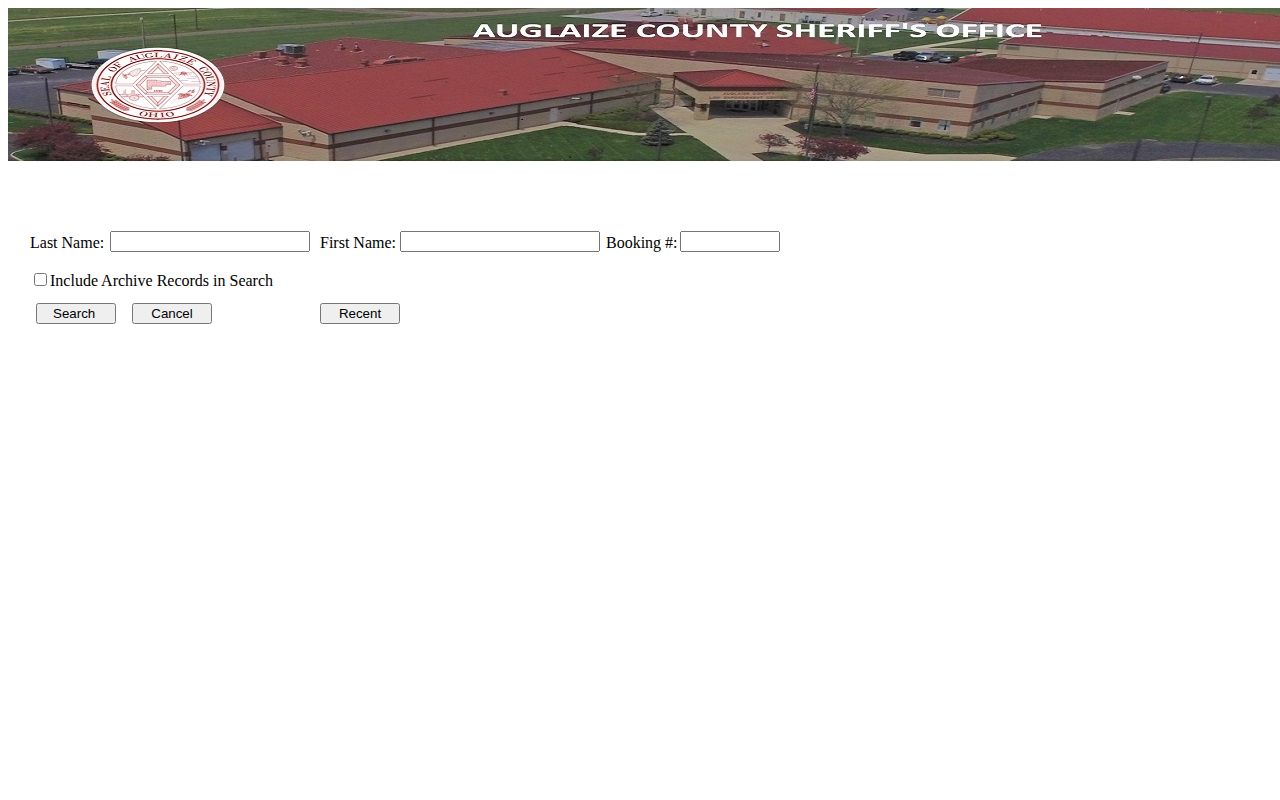
The interface provides no dedicated 72-hour switch. The selected interval is created by comparing the displayed release timestamps, not by activating a hidden or separate county feed.
A released row also does not answer where the person went. InCustody=N only closes the county booking record. It can describe community release, transfer to ODRC, transfer to another jail, or pickup under another authority. Preserve that distinction when reporting the result.
Confirm Auglaize Three-Day Departures
After locating a candidate row, verify it through the source that answers the next question. Use Common Pleas CourtView for felony matters and Municipal CourtView for misdemeanors and traffic cases. Match a case number when the booking supplies one. Look for bond orders, pleas, sentences, dismissals, commitments, termination entries, or other action after booking.
If the portal and docket do not resolve the event, request the existing booking and release record from the Sheriff. Identify the person and approximate dates. Include the booking or case number when known. Ask for the release timestamp, recorded custody disposition, or receiving agency if such information is maintained and releasable. The county has not published a specific fee for a release record, and Ohio law does not set a universal response-day promise.
ODRC Offender Search belongs in the chain only when a state commitment or state supervision relationship exists. Search by offender number when possible or use County of Commitment=Auglaize. An ODRC status of Incarcerated after the local booking ended suggests a transfer to state prison. APA Supervision indicates release from state incarceration under ODRC supervision, which is a different event from leaving the county jail.
VINE is useful for custody-event notice when someone registered before release. It is not a promised historical archive. A missing VINE result after three days should route back to the county archive, docket, or records request rather than being read as proof that no event occurred.
Auglaize Release Status Boundaries
Three days of departures can involve several systems. Keep the name of each status and the agency that created it. Collapsing them into a broad “released” label can hide a transfer or ongoing supervision.
| Record combination | Supported conclusion | Limit |
|---|---|---|
| County Release Date plus InCustody=N | The displayed Auglaize booking ended at the recorded time. | Does not identify the legal reason or rule out another custodian. |
| County InCustody=N plus ODRC Incarcerated | The person left the county jail and is in the state system. | Not a community release. |
| ODRC APA Supervision | The person left state incarceration under departmental supervision. | Not proof about the timing of an earlier county booking. |
| No row in Recent | No conclusion by itself. | Recent has no completeness or retention guarantee. |
For one named person, the Auglaize County released inmate lookup combines the county archive, court disposition, and system-specific follow-up paths. That route is more precise than scanning a group of recent bookings.
Public Record Search
Sponsored Results